

Beginner's Guide: Common Operational Issues of a Woven Bag Cutting, Sewing, Printing, and Collection Machine
Newcomers to the woven bag cutting, sewing, printing, and collecting machine will inevitably encounter various "minor issues" during practical operation—either uneven cutting, blurry printing, or messy collecting. These problems mostly stem from a lack of attention to operational details. Today, we'll explain common pitfalls for beginners and their corresponding solutions, based on real-world usage scenarios, to help you get started quickly and avoid unnecessary detours.
I. Preparations before powering on: Neglecting these details will lead to endless trouble later.
Common problem 1: Improper material feeding causes film jamming and misalignment upon machine startup.
Many beginners put the raw materials directly onto the machine, resulting in the woven bag film either getting stuck, shifting to one side, or even developing creases. This isn't a machine problem, but rather a result of improper material feeding.
Solution: Before threading the film, check the tension of the woven bag film to ensure that the film roll is flat and wrinkle-free; when threading the film, align it according to the markings on the machine guide rail, and the tension on both sides should be uniform, avoiding one side being loose and the other tight; after threading, manually pull the film to test it for 5-10 meters to confirm that the film can pass smoothly through each guide roller without jamming or deviation before starting the machine.
Practical tip: If the membrane material itself has slight wrinkles, you can gently smooth it out by hand before threading it to prevent wrinkles from entering the processing stage.
FAQ 2: Parameters are set randomly and the machine is “disobedient”
A common mistake beginners make is adjusting parameters based on intuition – for example, blindly increasing the feed speed to speed up the process, or randomly adjusting the blade pressure to make the cut smooth. The result is either inaccurate cutting dimensions or skipped stitches at the seam.
Solution: Before starting the machine, check the raw material specifications (width, thickness) and set them according to the "Parameter Reference Table" in the machine manual. For example, for a 50cm wide woven bag, set the feeding speed to medium (generally 20-30m/min), and adjust the blade pressure according to the film thickness (lighter for thinner films and slightly heavier for thicker films). For the printing section, first confirm that the printing plate size matches the bag specifications, and adjust the ink viscosity to a state where it "can adhere evenly to the printing plate without dripping or clumping".
Practical tips: Beginners are advised to start with "small-batch trial production". After adjusting the parameters, print 10-20 samples first. Once you confirm that there are no problems, then start mass production. Don't start at full capacity from the beginning.
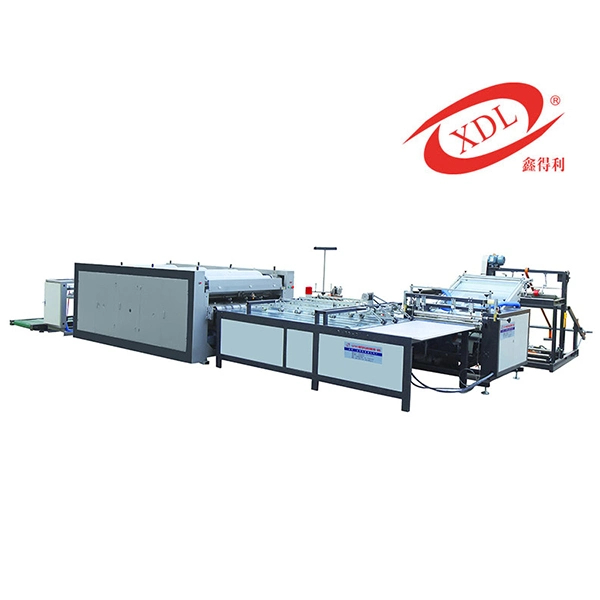
II. Practical Operation: Rapid Handling of High-Frequency Faults Without Waiting for a Technician
Common problem 1: Uneven cutting, size deviation, and rough edges.
This is a common headache for beginners – the cut bags are of varying lengths, with rough, uneven edges, and even "bursting edges." The main reasons are uneven feed tension, dull blades, or improperly adjusted positioning devices.
Solution: First, check if the feed roller is slipping. If slipping occurs, fine-tune the roller pressure to ensure stable material feeding. Next, check if the cutter is sharp. A dull cutter will cause burrs, so replace or sharpen the cutter in time. Finally, check the position of the positioning photoelectric sensor to ensure that it can accurately identify the positioning line of the bag. If the positioning is inaccurate, fine-tune the height and sensitivity of the photoelectric sensor.
Practical tip: If the cutting size deviation exceeds 2mm, stop the machine and check it first. Do not continue production with the problem, otherwise it will cause a lot of waste.
FAQ 2: Blurred printing, ghosting, or even no words printed
Poor printing results are mostly related to ink, printing plate, or pressure settings. Common problems for beginners include: ink that is too thick clogging the printing plate, insufficient pressure preventing printing, and excessive pressure causing ghosting.
Solutions: If the ink is too thick, add an appropriate amount of thinner and stir well (until it flows smoothly without clumping); if the ink is too thin, add more ink to avoid smudging; if there is residual ink on the printing plate, wipe it clean with a special cleaning agent to ensure the pattern is clear; finely adjust the printing pressure to ensure that the pattern is completely adhered, without missing prints or ghosting, and do not blindly increase the pressure.
Practical tip: Different types of woven bags (such as ordinary PP bags and laminated bags) require different inks. When changing materials, remember to change the ink accordingly to avoid printing failure or peeling.
Common problem 3: Skipped stitches, broken threads, and uneven stitches at the seams.
Most seam problems are caused by mismatched needle and thread types, improper bobbin tension, or worn needles. Beginners may not pay attention to the compatibility between the needle and thread and the thickness of the bag; for example, using a thin needle to sew a thick bag can easily cause the thread to break.
Solutions: Select the appropriate needle based on the thickness of the woven bag (use a thicker needle for thicker bags and a thinner needle for thinner bags), and ensure the needle and thread material matches the bag (e.g., use polyester thread for PP bags); check that the bobbin thread is correctly threaded, and adjust the tension to ensure "even stitches, neither loose nor tight"; if the needle is bent or worn, replace it with a new needle promptly to avoid skipped stitches.
Practical tip: Before sewing the edges, test 3-5 samples to check if the stitches are even and if there are any skipped stitches. If there are no problems, then proceed with mass production to avoid rework later.
Common Problem 4: Disorganized material collection, uneven stacking, and even tangling with the machine.
The material receiving process may seem simple, but it actually affects the uniformity of the finished product. Common problems for beginners include a mismatch between the material receiving speed and the processing speed, or uneven pressure on the material receiving rollers.
Solution: Adjust the receiving speed to ensure it is synchronized with the feeding speed (generally, the receiving speed should be slightly faster by 1-2 m/min to avoid the bags becoming loose); the pressure of the receiving rollers should be uniform, with consistent force on both sides to prevent the bags from shifting to one side; if tangling occurs during receiving, stop the machine and disconnect the power first, then slowly straighten the bag, and do not pull it hard, which may damage the bag.
Practical tip: Do not stack the bags on the receiving rack higher than the machine's specified height (generally no more than 50cm) to avoid them collapsing due to excessive stacking.
3. Tips for newbies to avoid pitfalls: These habits can reduce failures
Before starting the machine, three checks must be performed: check whether the raw material is flat, whether the parameters are matched, and whether all parts of the machine (cutter, needle, printing plate) are in normal working order.
During production, observe frequently: check the finished products every 10-15 minutes to see if the cutting size, printing effect, and seam quality are consistent;
Before leaving get off work, always perform "cleaning and maintenance": remove residual ink and waste from the machine, add lubricating oil to the transmission parts (as required by the instruction manual), and turn off the power and air supply;
Do not attempt to repair complex malfunctions: If there are abnormal noises or widespread malfunctions, stop the machine and disconnect the power. Contact the manufacturer's after-sales service or technical personnel. Do not disassemble the parts yourself.
Operating a woven bag cutting, sewing, printing, and receiving machine isn't difficult; the key is paying attention to detail. Beginners shouldn't rush; first, master the basic operations. Troubleshoot problems using the methods described above, and you'll gradually master the skills and achieve stable production. If you encounter any other issues not mentioned here during practical operation, feel free to contact our technical team for one-on-one guidance.




 鲁公网安备 37162202000141号